-PedroRima
Jogador
-
Joined
-
Last visited
-
 - Como Trocar o Nome De Exibição Do Fórum ? Dou + Pra Quem Ajudar !
 -
iJunior_CL, em 30 April 2013 - 11:03 AM, disse: Aguardando resposta. Aguardando a resposta do autor do tópico. Sem floods os demais membros. Poblema Resolvido ~OBRIGADO A TODOS~
-
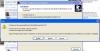
Anos o qual não jogo , Fui estalar o MuAwaY e deu o Seguinte erro . Alguém poderia me ajudar ?
-
quero o tutorial pra dc em guild (logo)
-
KKKK' fas tempo q n mexo aki no forum e Tou em duvida se o site pra hospeda musica é tinypic seila me esqueci me mandem aee
-
Ficamos felizes por + 1 player obrigado e sempre sempre iremos ajudar você
-
temos o tutorial http://forum.muaway.net/index.php?/topic/43218-tutorialopcoes-de-conversao-em-nosso-site/ boa sorte!
-
no seu caso podemos ver q você levou dc ao aperta "G" ou guild um tutorial para q isso n aconteça + http://forum.muaway.net/index.php?/topic/189-evitando-dc/
-
Aprenda a tirar membros fastama nesse link http://forum.muaway.net/index.php?/topic/269-tutorialtirando-membros-fantasmas-da-guild
-
Sim amigo '-'
-
Eu quero ser ban mas vaum tomar no cu admin
-
Bom amigo Este atrazo foi sua culpa pq Voce viu q os depositos etavam demorando e então sofra as conmcequencia desse atrazo
-
Boa garoto tenta Sempre evoluir q voce ira longe
-
Parabens a eles Principalmente Russo em '-'
-
Battlefield