Jump to content
View in the app

A better way to browse. Learn more.

Fórum - MuAwaY

A full-screen app on your home screen with push notifications, badges and more.

To install this app on iOS and iPadOS
  1. Tap the Share icon in Safari
  2. Scroll the menu and tap Add to Home Screen.
  3. Tap Add in the top-right corner.
To install this app on Android
  1. Tap the 3-dot menu (⋮) in the top-right corner of the browser.
  2. Tap Add to Home screen or Install app.
  3. Confirm by tapping Install.

PaNiC0

Jogador
  • Joined

  • Last visited

Everything posted by PaNiC0

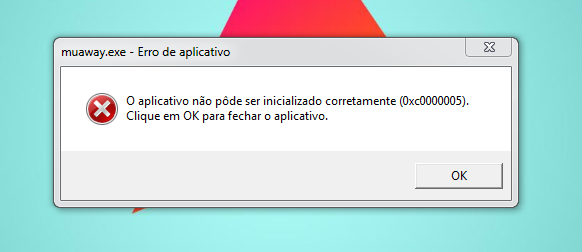
  1. Olá, Crazy fiz todos os procedimentos, porém ainda continua a mesma coisa, mais estava funcionando normalmente, ai quando foi ligar a ultima vez, ele atualizou e baixou alguns arquivos e apresento este erro.
  2. Boa noite, estou com um problema ao abrir o MuAway, ele atualiza porém quando desaparece a tela e que deveria abriR a outra em modo janela, aparece um erro. 0xc0000005. Obs: Já desinstalei e instalei de novo, já atualizei o Microsoft Visual C++ 2010 SP1, também já baixei o patch, Já desativei Firewall e Antivirus e até agora nada, se alguém souber como resolver, desde já obrigado. SEGUE EM ANEXO, IMAGEM DO ERRO.
Configure browser push notifications

Chrome (Android)
  1. Tap the lock icon next to the address bar.
  2. Tap Permissions → Notifications.
  3. Adjust your preference.
Chrome (Desktop)
  1. Click the padlock icon in the address bar.
  2. Select Site settings.
  3. Find Notifications and adjust your preference.