Jump to content
View in the app

A better way to browse. Learn more.

Fórum - MuAwaY

A full-screen app on your home screen with push notifications, badges and more.

To install this app on iOS and iPadOS
  1. Tap the Share icon in Safari
  2. Scroll the menu and tap Add to Home Screen.
  3. Tap Add in the top-right corner.
To install this app on Android
  1. Tap the 3-dot menu (⋮) in the top-right corner of the browser.
  2. Tap Add to Home screen or Install app.
  3. Confirm by tapping Install.

erlans

Jogador
  • Joined

  • Last visited

Everything posted by erlans

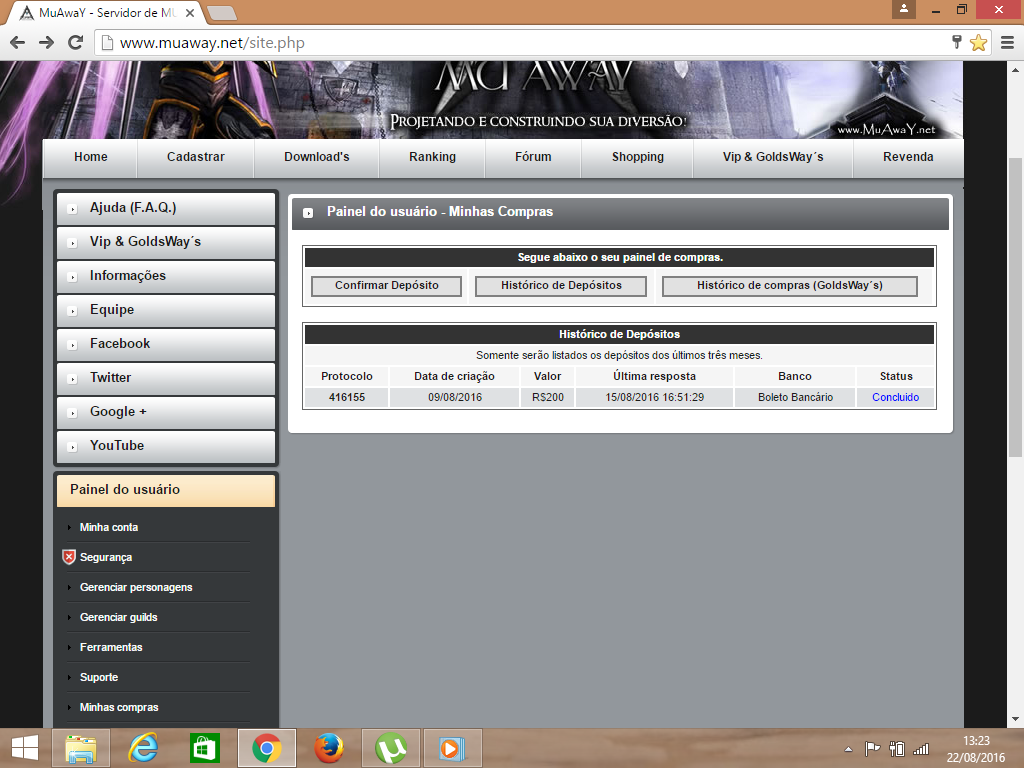
  1. OLÁ, GOSTARIA DE SABER QUANDO VOCES VAO PARAR DE APAGAR MEUS POSTES E RESOLVER MEU PROBLEMA,COMPREI GOLDWAY NA FORMA DE BOLETO BANCARIO A COMPRA FOI CONFIRMADA A UMA SEMANA EXATAMENTE E ATE HOJE MEUS PREMIOS REFERENTE A PROMOÇAO NUNCA FORAM ENTREGUES EM MEU BAU. JA MANDEI TICKETS NO SETOR FINACEIRO, MANDEI E E-MAIL E ATE AGORA NENHUMA RESPOSTA.. ACHO QUE SERIA MAIS FACIL RESOLVER OS PROBLEMAS DO QUE SIMPLENTE IGNORAR E FICAR APAGANDO OS POSTS. ESPERO Q RESOLVAM MEU PROBLEMA AGRADECIDO DESDE JA.
Configure browser push notifications

Chrome (Android)
  1. Tap the lock icon next to the address bar.
  2. Tap Permissions → Notifications.
  3. Adjust your preference.
Chrome (Desktop)
  1. Click the padlock icon in the address bar.
  2. Select Site settings.
  3. Find Notifications and adjust your preference.
