Jump to content
View in the app

A better way to browse. Learn more.

Fórum - MuAwaY

A full-screen app on your home screen with push notifications, badges and more.

To install this app on iOS and iPadOS
  1. Tap the Share icon in Safari
  2. Scroll the menu and tap Add to Home Screen.
  3. Tap Add in the top-right corner.
To install this app on Android
  1. Tap the 3-dot menu (⋮) in the top-right corner of the browser.
  2. Tap Add to Home screen or Install app.
  3. Confirm by tapping Install.

lGhusTzl

Jogador
  • Joined

  • Last visited

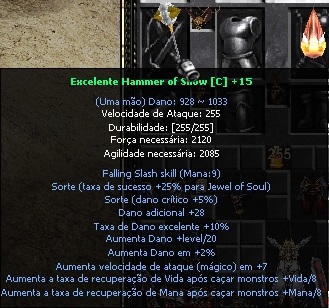
  1. Boa noite, gostaria de saber se esta correto essa Hammer of Snow não ter as "Options Snow", conforme ilustra no topico da promoção.
  2. VENDO SET RODOLPH [M] SEM TAXA = TAXA ++ SO CHAMAR MP
  3. COMPRO SW OF WAR = 13 RLK
  4. V > Kit mc santa = 2 rlk ou ? v > 2 sw santa = 1 rlk ou ? Chama in-game
  5. Obrigado a todos, jogo funcionando normalmente !
  6. Meu mu ele trava do nada e fica congelado a tela, nao consigo mover o personagem nem algo referente ao game. Gostaria de saber se tem alguma solução para isso, pois quando trava tenho q reiniciar o pc pra entrar novamente no jogo. Obs: Quando o jogo trava nao consigo dar Alt+F4 para fechar o jogo, so reiniciando o pc.
Configure browser push notifications

Chrome (Android)
  1. Tap the lock icon next to the address bar.
  2. Tap Permissions → Notifications.
  3. Adjust your preference.
Chrome (Desktop)
  1. Click the padlock icon in the address bar.
  2. Select Site settings.
  3. Find Notifications and adjust your preference.