Jump to content
View in the app

A better way to browse. Learn more.

Fórum - MuAwaY

A full-screen app on your home screen with push notifications, badges and more.

To install this app on iOS and iPadOS
  1. Tap the Share icon in Safari
  2. Scroll the menu and tap Add to Home Screen.
  3. Tap Add in the top-right corner.
To install this app on Android
  1. Tap the 3-dot menu (⋮) in the top-right corner of the browser.
  2. Tap Add to Home screen or Install app.
  3. Confirm by tapping Install.

maah

Jogador
  • Joined

  • Last visited

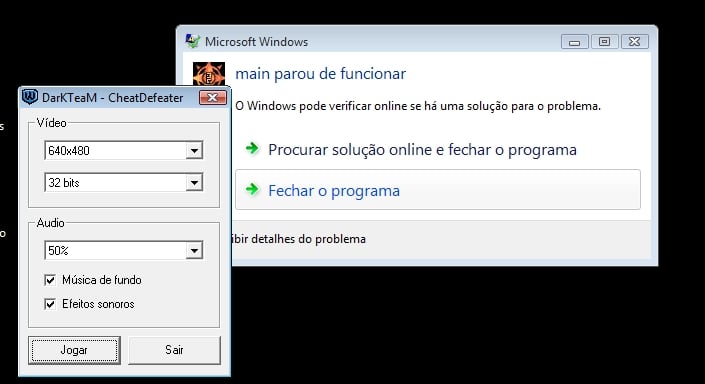
  1. bom dia admim. baixei o novo anti-hacker extari na pasta certinho abri o launcher.exe quado clikei em jogar apreceu uma mensagen escrito
  2. bom dia admim. baixei o novo anti-hacker extari na pasta certinho abri o launcher.exe quado clikei em jogar apreceu uma mensagen escrito
  3. eu baixei o pacth, extrai na pasta certinho, abri o icone azul chamado laucher.exe abriu mas quando clikei em jogar apareceu uma mensagen escrito "main.exe parou de funciona"
Configure browser push notifications

Chrome (Android)
  1. Tap the lock icon next to the address bar.
  2. Tap Permissions → Notifications.
  3. Adjust your preference.
Chrome (Desktop)
  1. Click the padlock icon in the address bar.
  2. Select Site settings.
  3. Find Notifications and adjust your preference.