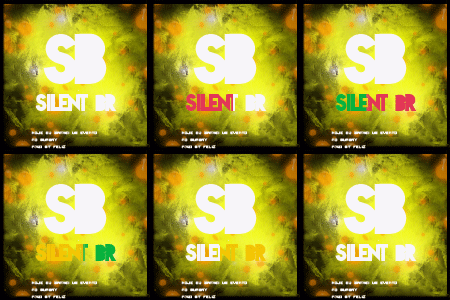
November 6, 201312 yr comment_4050977 Como chama a primeira fonte dessa imagem, essa que esta grudada tlg. Report
November 6, 201312 yr comment_4051123 - Caro Membro, Tanto em cima quanto em baixo esta sendo utilizada a font NovaSolid Preview: Segue abaixo o link para Download da mesma. http://www.dafont.com/pt/nova-solid.font?text=Silent+BR http://www.dafont.com/pt/nova-solid.font?text=Silent+BR GOSTOU DA SIGN ACIMA? ADQUIRA JÁ, CHAMA NA MP! Report
November 6, 201312 yr comment_4051125 Correto. xNath, em 06 November 2013 - 12:43 AM, disse:- Caro Membro, Tanto em cima quanto em baixo esta sendo utilizada a font NovaSolid Preview: Segue abaixo o link para Download da mesma. http://www.dafont.com/pt/nova-solid.font?text=Silent+BR http://www.dafont.com/pt/nova-solid.font?text=Silent+BR Report
November 6, 201312 yr comment_4051126 Dúvida respondidaCaso precise reabrir o tópico, me envie uma MP solicitando. Report