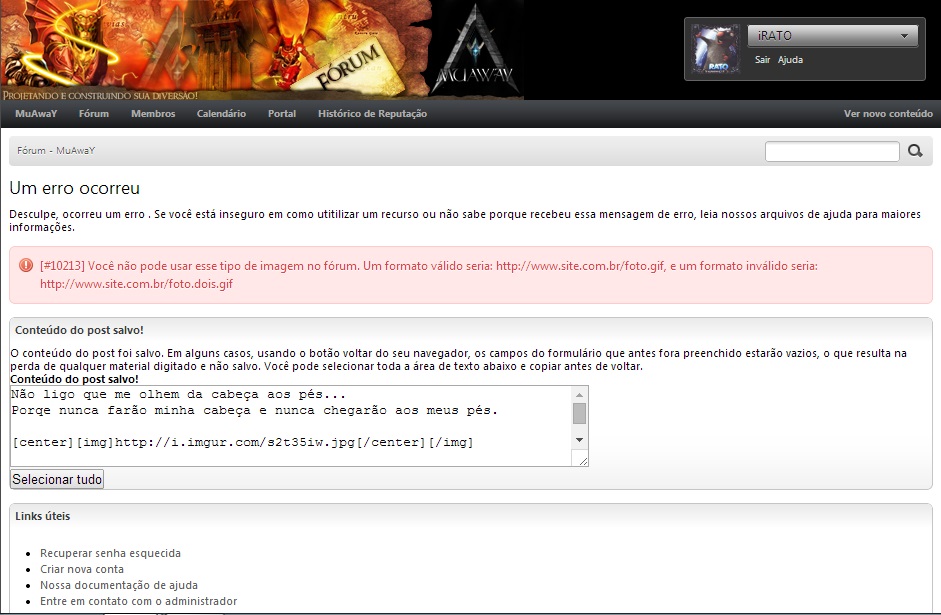
May 23, 201411 yr comment_4352441 Gostaria de saber por que quando eu vou colocar uma foto no meu forum está dando este erro !! Report
May 23, 201411 yr comment_4352442 Isso está ocorrendo por causa do link que você está hospedando a imagem, faça o seguinte, salve a imagem em sua máquina e hospede no site [ http://imgur.com/ ] copie o link e tente colocar em seu perfil novamente. Você tá colocando o link de forma incorreta, você está colocando da seguinte forma: [center][img] LINK DA IMAGEM[/center][/img] O certo é assim: [center][img] LINK DA IMAGEM[/img][/center] Edited May 23, 201411 yr by Fael_ Report
May 23, 201411 yr comment_4352443 Olá, Caro amigo isso ocorre quando da um bug no imgur aconteceu isso uma vez e eu hospedei a imagem e outro site abaixo uns sites. TinyPic: http://tinypic.com/ PhotoBucket: http://photobucket.com/ BRIMG: http://www.brimg.com Imageshack: http://imageshack.us/ ImageHosting: http://www.imagehosting.com/ Logo após ter feito os processo de hospedagem segue exemplo de como coloca a imagem. [center][img] Link da mesma[/img*][/center*] Obs: Retira o * , não precisa bota ele só botei para mostra o Exemplo! Edited May 23, 201411 yr by Shot Atenciosamente, Leonardo-Shot MuAwaY - Projetando e construindo sua diversão! Report
May 23, 201411 yr comment_4352444 O motivo de sua imagem está dando este erro é porquê você esta colocando incorretamente o código, abaixo ele correto: [center][img][/img][/center] Report
May 23, 201411 yr comment_4352445 Na imagem apresentada, o senhor inseriu a tag de forma incorreta, o certo seria: [img]link da imagem[/img] Obs: O senhor colocou a ferramenta [/center] na frente do [/img], portanto acabou ocorrendo esse erro. Edited May 23, 201411 yr by Factory_ Report
May 23, 201411 yr comment_4352450 Vi na imagem que o senhor está fazendo o uso incorreto da TAG. Sugiro então realizar o procedimento correto : [center][img] LINK DA IMAGEM[/img][/center] Atenciosamente, Lucas_GM MuAwaY - Projetando e construindo sua diversão! Você jogador! Faça a segurança de sua conta usando a central de segurança do MuAwaY! Report
May 23, 201411 yr comment_4352451 Dúvida respondidaCaso precise reabrir o tópico, me envie uma MP solicitando. Atenciosamente, Lucas_GM MuAwaY - Projetando e construindo sua diversão! Você jogador! Faça a segurança de sua conta usando a central de segurança do MuAwaY! Report