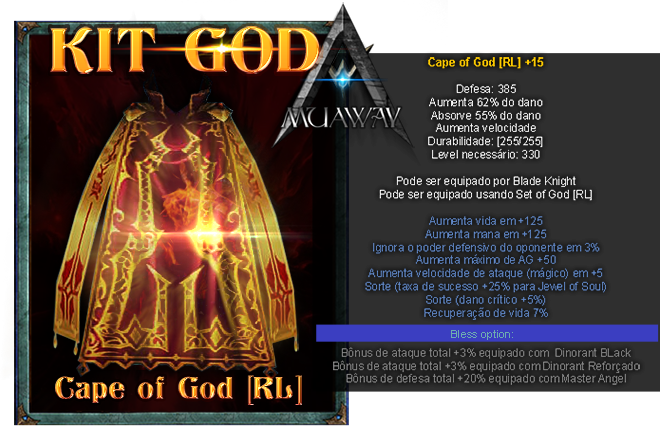
June 10, 20169 yr comment_5219396 Qual a real defesa da nova Cape of GOD? Foram apresentadas duas imagens com defesas diferentes. Report
June 10, 20169 yr comment_5219475 A defesa real da Cape of God é a que se encontra dentro de nosso servidor,entretanto é a de 336.Pois esta defesa pode ser alterada como muitas já foram. Edited June 10, 20169 yr by Nagayoshi Report
June 10, 20169 yr comment_5219476 MG_Marcio, em 10 June 2016 - 08:51 PM, disse:Qual a real defesa da nova Cape of GOD? Foram apresentadas duas imagens com defesas diferentes. Acredito que a do Game! Report
June 10, 20169 yr comment_5219479 Acredito que a defesa seja da imagem direta do game, no caso seria 336. Porém devemos aguardar até que a Cape of God seja inserido para visualizar. Atenciosamente, Bird! MuAwaY - Projetando é construindo sua diversão! Report
June 10, 20169 yr comment_5219480 Dúvida respondidaCaso precise reabrir o tópico, me envie uma MP solicitando. Atenciosamente, Bird! MuAwaY - Projetando é construindo sua diversão! Report