Jump to content
View in the app

A better way to browse. Learn more.

Fórum - MuAwaY

A full-screen app on your home screen with push notifications, badges and more.

To install this app on iOS and iPadOS
  1. Tap the Share icon in Safari
  2. Scroll the menu and tap Add to Home Screen.
  3. Tap Add in the top-right corner.
To install this app on Android
  1. Tap the 3-dot menu (⋮) in the top-right corner of the browser.
  2. Tap Add to Home screen or Install app.
  3. Confirm by tapping Install.
how is this possible that i've been hacked this brazil ip? im a solo player and never join any social site related to this game. this is my 1st time that i've been hacked for my 15yrs of experince of online games, only in this server....pls explain this to me....
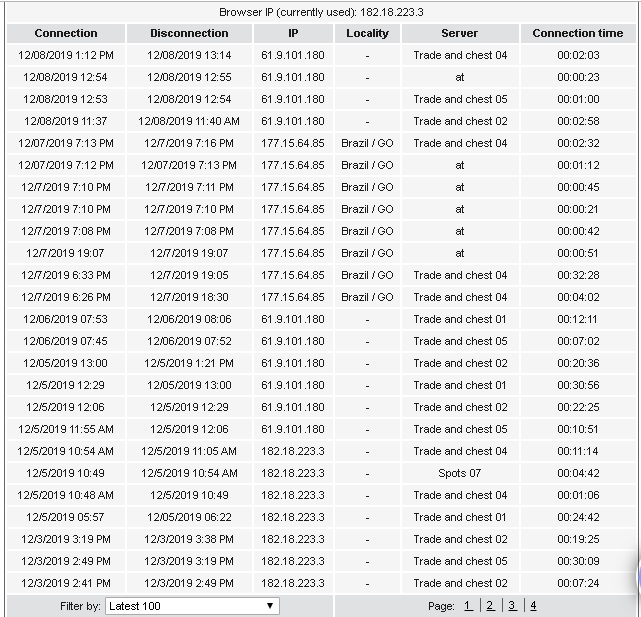

111.jpg

Featured Replies

Hello, be careful when downloading "" programs "" from sites this can end up harming you and losing your account, never click on third party link.
Atenciosamente, Rusty
MuAwaY - Projetando e construindo sua diversão!

Imagem
Imagem
Imagem
hello, send ticket on the site informing what happened.
To submit a ticket, log in to the site, go to the support department.
Response time is up to 72 business hours

Edited by -Ex_G3D0Mc

Atenciosamente. -Ex_G3D0Mc,
MuAwaY projetando e construindo a sua diversão!


Imagem
Imagem
Hi,

We know how sad it is to be robbed in the game.

However, we offer a 100% secure game for hacker or account protection. The responsibility of taking care of the items as well as the account is of each player, we cannot be responsible for this task.

When you get robbed, it is not a failure in our security systems, but a human one, which can be:

• Trust a player in a possible exchange of two trades;
• Download infected files where the user collects their data and has access to the account;
• Lend items to someone you know;
• Do not check the negotiation items before giving OK and accepting;
• Believe in false promises of items, miracle programs or coin giving.

Anyway, we are sorry for your loss, but we can do nothing to recover lost items.
Atenciosamente, DiviX
MuAwaY - Projetando e construindo sua diversão!
Guest
This topic is now closed to further replies.

Configure browser push notifications

Chrome (Android)
  1. Tap the lock icon next to the address bar.
  2. Tap Permissions → Notifications.
  3. Adjust your preference.
Chrome (Desktop)
  1. Click the padlock icon in the address bar.
  2. Select Site settings.
  3. Find Notifications and adjust your preference.