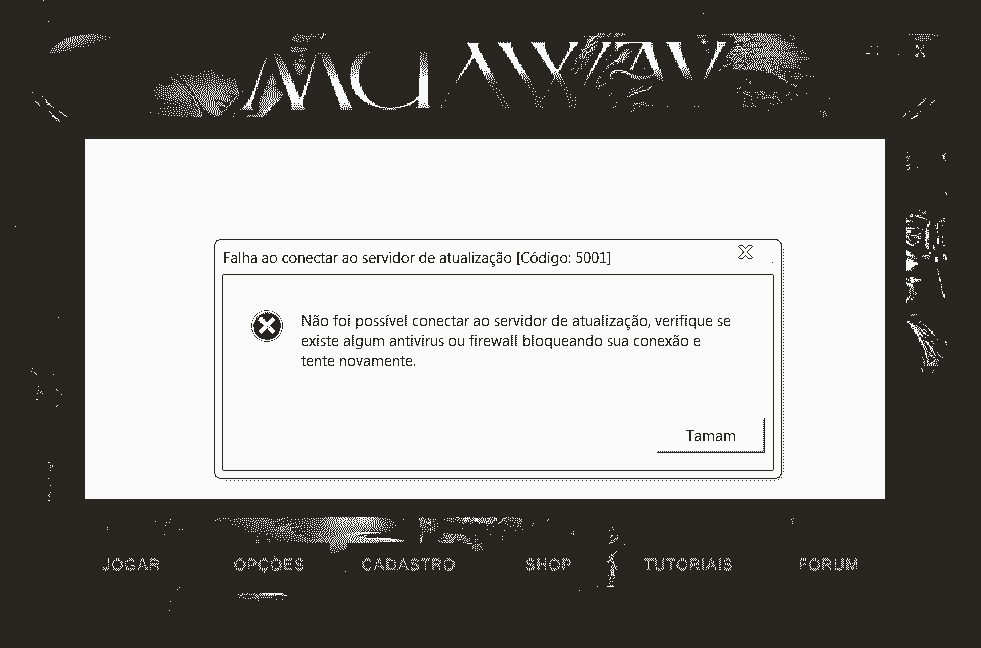
May 30, 20205 yr comment_6122176 Hello , i cant join in the game . gives the error in the picture , please help me . thanks. Report
May 30, 20205 yr comment_6122177 Greetings! I recommend that you try the following procedure: Quote1st: right click on the MuAwaY Icon. 2nd: Click on "Open file location" 3rd: Look for the files "Update" and "Settings" and delete both of them 4th: Right click on the MuAwaY Icon and then click on Run as administrator and try starting the game. By the way if this procedure does not work I recommend you contact the support group through the following email: suporte@muaway.net or divix@muaway.net Edited May 30, 20205 yr by Deus Report
May 30, 20205 yr comment_6122178 Good morning, Check that the game is not open closing the launche and Pressing the key F9, if it doesn't work, perform the procedure below. Spoiler If the above procedure does not resolve, I recommend that you perform the procedure in the tutorial below and disable your firewall and antivirus. [Tutorial] - Removendo o MuAwaY completamente de seu computador @Edit:Alteração no texto para Idioma English. Edited May 30, 20205 yr by LUIG Report
May 30, 20205 yr comment_6122179 Hello, Check if you have any antivirus or firewall active, if you have it disabled, if it doesn't work perform this procedure: Quote1. Right-click on the MuAwaY launcher; 2. Go to open file location; 3. Search for and delete the Update file; 4. Run the launcher as an administrator, and wait to update Atenciosamente, Bia_GM MuAwaY - Projetando e construindo sua diversão! Report
May 30, 20205 yr comment_6122180 Hello, Try the following procedure: Quote1º- Click on the server Launcher with Right Mouse Button. 2º- Click on "Open File Location". 3rd - Locate and Delete the files "Update" and "Settings" 4th - Run the Launcher as an administrator and try to log in again. In case it doesn't work, I advise that you are completely uninstalling the server and installing again, I will leave a tutorial below so that you can do it in the correct way and thus solving your problem: [Tutorial] - Removendo o MuAwaY completamente de seu computador If both methods do not work, contact support via email at: suporte@muaway.net and explain your problem, the administration will assist you until it is resolved. We look forward to your reply. Atenciosamente: Menor MuAwaY - Projetando e Construindo sua diversão. Report
May 30, 20205 yr comment_6122181 This error is very easy to solve, just click with the right mouse button on the MuAwaY icon, open the game's files folder and delete the Update and Settings folders, after that, just start the launcher normally wants to update the server. Edited May 30, 20205 yr by Kuhn Report
May 30, 20205 yr comment_6122182 Como o motivo é muito claro, analise se é o anti-vírus que está impedindo a execução do jogo, depois de desativar, tente novamente para abrir o jogo e veja se é bem-sucedido. As the reason is very clear, analyze if it is the Anti-virus that is preventing the game from running, after deactivating try again to open the game and see if it is successful Report
May 30, 20205 yr comment_6122183 Hellow, I recommend that you delete the Update.ini file from the game folder and do the update again. Also disable your computer's Firewall and Anti-Virus. If your problem has not been resolved please contact us by email suporte@muaway.net. Atenciosamente, Bira - Travar! MuAwaY! - Projetando e construindo sua diversão. Report
May 30, 20205 yr comment_6122184 Hi! Quote1º- Click on the server Launcher with Right Mouse Button. 2º- Click on "Open File Location". 3rd - Locate and Delete the files "Update" and "Settings" 4th - Run the Launcher as an administrator and try to log in again Continuing, address by email: suporte@muaway.net or divix@muaway.net Report
May 30, 20205 yr comment_6122185 Follow the steps below to solve this problem: Quote1st: Right click on the MuAwaY Icon. 2nd: Click on "Open file location" 3rd: Look for the files "Update" and "Settings" and delete both of them 4th: Right click on the MuAwaY Icon and then click on Run as administrator and try starting the game. Report
May 30, 20205 yr comment_6122209 Turn it off firewall or antivirus, switch the setting to off. You need to use that's being blocked, you can allow it through the firewall, instead of turning the firewall off. If the procedures above informed by me and support members does not have helped you, you should send an email address to suporte@muaway.net or divix@muaway.net. Report
May 30, 20205 yr comment_6122210 Resolvido.Caso precise reabrir o tópico, me envie uma MP solicitando. Report